You can now order ASIC searches directly from within One Flow, across all matter types.
When you select ASIC Searches from All Services, a dedicated ASIC Searches milestone is created in your matter. From there, you can complete your order and run any additional ASIC searches for that matter, all without leaving your workflow. Results are saved automatically to Orders and documents.
This is available now across all matter types where One Flow is used. No setup required.
4 June 2026
Auto Consol Lot and Plans now supported on NSW One Flow Purchase Matters
NSW One Flow now supports auto-consolidated properties on purchase matters. When a title reference resolves to an auto-consol or Volume/Folio property, you can capture all of its lot and plan details in one place and order certificates against them — without leaving the verification flow.
This removes the manual workarounds previously needed for multi-lot/plan properties, making verification faster, clearer and more reliable.
Where do I find it?
The new Auto Consol lot and plans dialog appears automatically during property verification on NSW One Flow purchase matters. Enter your matter reference and title reference, select Verify, and when the system detects an auto-consol or Volume/Folio property the dialog opens.
How it works
Capturing a consolidated property is a simple three-step flow:
1. Verify the property: Enter your matter and title reference and select Continue. If the property is auto-consol or Volume/Folio, the Auto Consol lot and plans dialog opens, displaying the full property address.
2. Review and confirm the lot and plans: Rows are pre-populated from the authority response — each capturing Lot (required), Section (optional) and Plan (required). A spare row is always available for manual entry, with format checked in real time. Add, edit or remove rows as needed, then select Confirm.
3. Order against the consolidated property: The confirmed details appear on the properties detail page as a single row (Ref., Address, Proprietor, Council) with a Lot & plans badge showing the number of entries. Select Continue to move to the catalogue and order certificates, using the Multiple view to review all lot/plan references.
What you need to know
The dialog is triggered automatically when an auto-consol or Volume/Folio property is detected — there is no extra setup or service to select.
The lot and plan rows in the auto-consol dialog are pre-loaded from your previous NSW Register Search orders for the title. If you don’t have any NSW Register Search orders for this auto-consol title, refer to the parent title search under the Schedule of Parcels section.
Lot and Plan are mandatory; Section is optional. Entries are validated in real time, and any invalid formats must be corrected before you can confirm.
You can edit or remove the lot and plan entries at any time before ordering, via the Lot & plans button on the property row.
Certificates are ordered as usual once the property is confirmed.
1 June 2026
AML Onboarding available through One flow
The new AML Onboarding experience gives users access to all the Tranche 2 checks and features they will need to meet the new regulatory requirements coming into effect on 1 July. This includes KYC/KYB forms, PEPs, Sanctions and Adverse Media checks and Source of Funds and Wealth Check.
The milestone in One flow has been renamed to AML Onboarding incl. VOI to reflect this new functionality when onboarding your clients.
0 Votes
0 Comments
People who like this
Delete Comment
This post will be deleted permanently. Are you sure?


25 June 2026
ASIC searches now available in One Flow
You can now order ASIC searches directly from within One Flow, across all matter types.
When you select ASIC Searches from All Services, a dedicated ASIC Searches milestone is created in your matter. From there, you can complete your order and run any additional ASIC searches for that matter, all without leaving your workflow. Results are saved automatically to Orders and documents.
This is available now across all matter types where One Flow is used. No setup required.
4 June 2026
Auto Consol Lot and Plans now supported on NSW One Flow Purchase Matters
NSW One Flow now supports auto-consolidated properties on purchase matters. When a title reference resolves to an auto-consol or Volume/Folio property, you can capture all of its lot and plan details in one place and order certificates against them — without leaving the verification flow.
This removes the manual workarounds previously needed for multi-lot/plan properties, making verification faster, clearer and more reliable.
Where do I find it?
The new Auto Consol lot and plans dialog appears automatically during property verification on NSW One Flow purchase matters. Enter your matter reference and title reference, select Verify, and when the system detects an auto-consol or Volume/Folio property the dialog opens.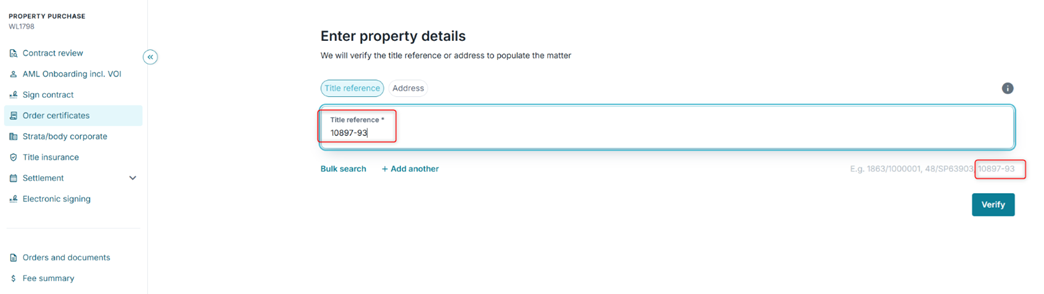
How it works
Capturing a consolidated property is a simple three-step flow:
1. Verify the property: Enter your matter and title reference and select Continue. If the property is auto-consol or Volume/Folio, the Auto Consol lot and plans dialog opens, displaying the full property address.
2. Review and confirm the lot and plans: Rows are pre-populated from the authority response — each capturing Lot (required), Section (optional) and Plan (required). A spare row is always available for manual entry, with format checked in real time. Add, edit or remove rows as needed, then select Confirm.
3. Order against the consolidated property: The confirmed details appear on the properties detail page as a single row (Ref., Address, Proprietor, Council) with a Lot & plans badge showing the number of entries. Select Continue to move to the catalogue and order certificates, using the Multiple view to review all lot/plan references.
What you need to know
1 June 2026
AML Onboarding available through One flow
The new AML Onboarding experience gives users access to all the Tranche 2 checks and features they will need to meet the new regulatory requirements coming into effect on 1 July. This includes KYC/KYB forms, PEPs, Sanctions and Adverse Media checks and Source of Funds and Wealth Check.
The milestone in One flow has been renamed to AML Onboarding incl. VOI to reflect this new functionality when onboarding your clients.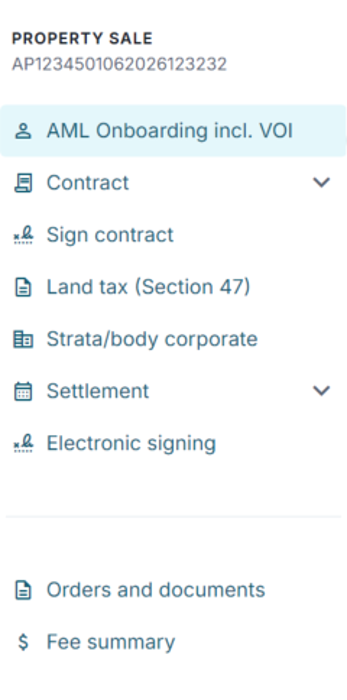
0 Votes
0 Comments