Version 9.15 of the triConvey Desktop App contains the following New Features and Refinements.
New features
New contact card fields for AML compliance
To support the upcoming Anti-Money Laundering (AML) compliance requirements, we have added the following features to assist with record-keeping in triConvey:
On the contact card
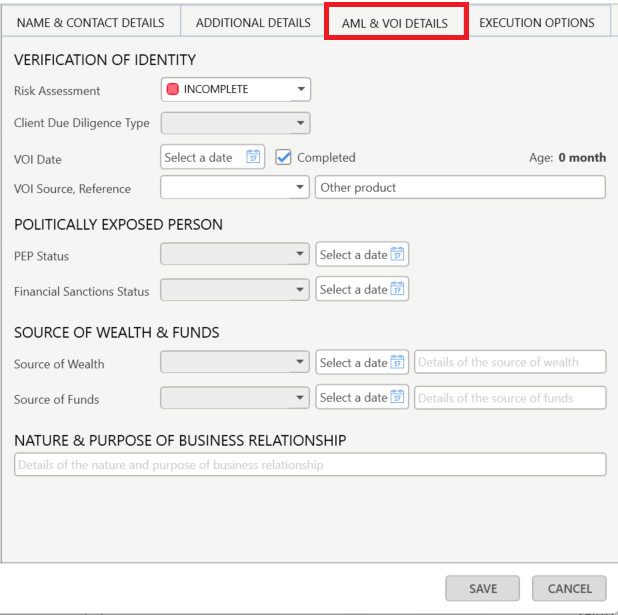
The VOI/Execution Options tab on contact cards has been reworked into the AML & VOI Details and the Execution Options tabs.
Before
After
On the matter
The VOI status pill is now shown on all matter types, and has been renamed to AML & VOI. The Risk Assessment status is displayed next to the AML & VOI pill.
The Risk Assessment status also appears on the Contact Details Matter Widget.
On the Contacts List
The Risk Assessment column has been added as an optional column you can include in your Contacts View.
On Precedents New AML fields are available for Person and Organisation type contact cards.
On Reports The new AML Report allows you to run a report on clients with VOI data or clients without VOI data. The report columns include:
Matter Type
Matter Number
Full Name
Email
VOI Date
VOI Expiry Date
Age
Status
Risk Assessment
Client Due Diligence Type
PEP Status
PEP Financial Sanctions Status
Source of Wealth
Source of Wealth Description
Source of Funds
triSearch AML Compliance Centre
A new AML button has been added to the left-hand panel on the main triConvey Desktop App window. This button opens the new triSearch Compliance Centre.
The triSearch AML Compliance Centre is designed for your firm's designated AML Compliance Officer to quickly access a firm-level view of contact risk ratings for compliance purposes. Learn more about the triSearch AML Compliance Centre here.
New APIs for trust accounting
We have added API support to the following:
Ability to create a Trust Payment request
Ability to get a list of Trust Transactions for a matter
Ability to get a list of Trust to Office transfers
Refinements
Workflows no longer trigger on closed matters
Fixed an issue where Workflows were automatically triggering when viewing a Closed matter for the first time (usually after a data migration).
Branch filter added to the Matter List
You can now filter your Matter List by Branch.
Improvements to Data Backup
The triConvey Settings Data Backup tool to back up Matters and Contacts has been updated.
Select Create Data Backup in the Matters & Contacts tab to generate a data backup of your Contacts, Matters and Matter Roles in a .CSV.
You can now only access data backups from within the Data Backup section in triConvey Settings. Previously, data backups were sent via email, which posed a security concern.
Data Backups will expire 7 days after they are requested.
Notable Bug Fixes
Fixed a bug where some matter activity was not recorded if the matter was opened for the first time or the matter type was changed.
Fixed a bug where the Billing and Conveyancing Critical Dates widgets erroneously appeared in Lead files.
Fixed a bug where after a Staff Role was re-assigned on a Matter, the new assignee was not notified of the assignment.
Fixed a bug where the Confirm Workflow window did not appear when opening a lead or matter for the first time.
Fixed a bug where Asks were not appearing in the correct order when generating a document.
Fixed a bug where matter layout windows appeared blank upon opening.
Resolved the error "Some files were not saved to the matter" when assigning emails to matter.
Fixed an issue with saving Documents and Excel spreadsheets.
0 Votes
0 Comments
People who like this
Delete Comment
This post will be deleted permanently. Are you sure?


Version 9.15 of the triConvey Desktop App contains the following New Features and Refinements.
New features
New contact card fields for AML compliance
To support the upcoming Anti-Money Laundering (AML) compliance requirements, we have added the following features to assist with record-keeping in triConvey:
The VOI/Execution Options tab on contact cards has been reworked into the AML & VOI Details and the Execution Options tabs.
Before
After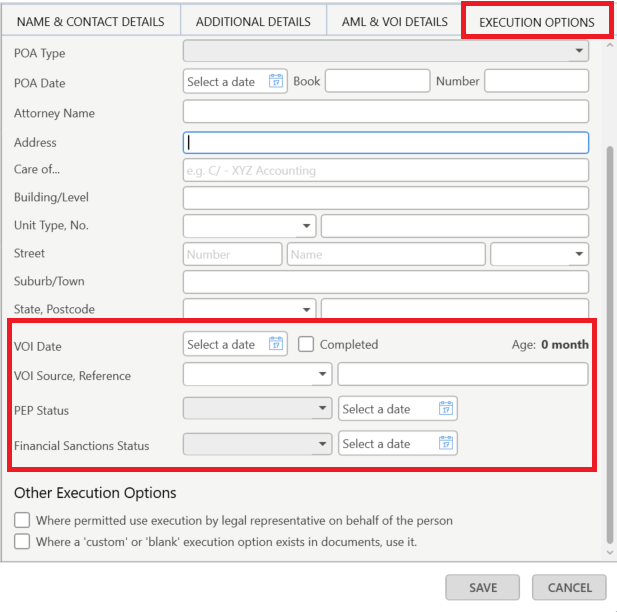
The VOI status pill is now shown on all matter types, and has been renamed to AML & VOI. The Risk Assessment status is displayed next to the AML & VOI pill.
The Risk Assessment status also appears on the Contact Details Matter Widget.
The Risk Assessment column has been added as an optional column you can include in your Contacts View.
New AML fields are available for Person and Organisation type contact cards.
The new AML Report allows you to run a report on clients with VOI data or clients without VOI data. The report columns include:
triSearch AML Compliance Centre
A new AML button has been added to the left-hand panel on the main triConvey Desktop App window. This button opens the new triSearch Compliance Centre.
The triSearch AML Compliance Centre is designed for your firm's designated AML Compliance Officer to quickly access a firm-level view of contact risk ratings for compliance purposes. Learn more about the triSearch AML Compliance Centre here.
New APIs for trust accounting
We have added API support to the following:
Refinements
Workflows no longer trigger on closed matters
Fixed an issue where Workflows were automatically triggering when viewing a Closed matter for the first time (usually after a data migration).
Branch filter added to the Matter List
You can now filter your Matter List by Branch.
Improvements to Data Backup
The triConvey Settings Data Backup tool to back up Matters and Contacts has been updated.
Notable Bug Fixes
0 Votes
0 Comments