Version 10.1 of the triConvey Desktop App contains the following new features and refinements.
New Features
Improved Matter Permissions
Rollout of the improved Matter Permissions will commence from mid October.
We have updated the Permissions section within matters in the triConvey Desktop App and introduced a way to configure Matter Permissions in the triConvey Companion Site Web App. Changes made in the Desktop App will also apply to the Web App, and vice versa.
Changes to Matter Permissions in the triConvey Desktop App
The Matter Settings > Permissions tab now displays a list of staff and a Select all option by default, instead of splitting these options.
BEFORE
AFTER
In addition, you can now Restrict users created after today from accessing this matter. Check this option to prevent new staff from being able to access this matter by default.
New Matter Permissions Setting in the triConvey Companion Site Web App
You can now set Matter Permissions from within the triConvey Companion Site Web App, by selecting Manage access in the top-right corner of the matter.
You can set up the permissions on this matter in one of two ways:
Open: Everyone in your firm can access this matter.
Restricted: No one in your firm can access this matter, except for users you have selected.
Refer to the expected behaviour of each configuration below:
Open with Restrict users created after today toggled Off: This means all users (existing and future) can access the matter.
Open with Restrict users created after today toggled On: This means all existing users can access the matter. Users added to your firm after this date cannot access the matter by default.
Restricted with Restrict users created after today toggled Off: This means the following users can access the matter:
Staff with roles on the matter (e.g. Supervisor, Attorney Responsible, Attorney Assisting) and;
Any users selected from the Staff with access drop-down menu, and;
Users added to your firm after today.
Choose this configuration if you would like to restrict some existing staff from accessing the matter.
In this example, only "Jeff Hayes", "Michael Meaney", "Teja Gowda" and "Toby Topsy" can access this matter today. If new staff members join after today, they can also access this matter.
Restricted with Restrict users created after today toggled On: This means the following users can access the matter:
Staff with roles on the matter (e.g. Person Responsible, Introducer) and;
Any users selected from the Staff with access drop-down menu.
In this example, only "Josh Testoe" can access this matter today and in the future.
Record AML Risk Assessments at matter-level
You can now keep a record of AML/KYC risk assessments on a matter, instead of solely in a contact card.
Under AML/CTF (Tranche 2) regulations, compliance and KYC obligations apply on a transaction-by-transaction basis for each designated service rather than to the client as a single entity.
Providing matter-level designations, audit trails, and reporting ensures your law firm can maintain statutory compliance and preserve accurate historical due diligence records for every matter.
To complete a Risk Assessment on a matter:
1. Open a matter in the triConvey Desktop App.
2. Double-click on the Info line under Matter Details.
3. Select the AML/CTF tab.
4. Next to Designated service(s)?, select Yes or No.
If you select Yes, complete the additional fields in the window, then select OK to save.
The Matter Risk Assessment field captures the risk profile of the transaction/matter and should remain static for historical accounting purposes.
The Matter Due Diligence Date should be when the AML activities have been completed (in the future, this field will sync with triSearch when you click Onboard in the Compliance Centre).
The Matter Source of Funds and related fields capture where the money the client is using to pay for these designated service(s) is originating from.
Enter any additional notes in the AML Details field.
If you select No, the additional fields in the window will be disabled and the Matter Risk Assessment changes to Not Applicable. Select OK to save.
In addition, a new Risk Assessment column can now be selected from the Matter List when right-clicking the headings.
Refinements
Contact-level AML display changes
The Risk Assessment pill for the Client in a matter now lives in the Contact Details widget on the right-hand panel.
"Email as PDF" option for attachments when using New Outlook
If your firm is using New Outlook, right-clicking on one or more Word documents in the Documents List of a matter will now allow you to send these documents as PDF/s.
Note: The PDF is not saved back to the matter - it only exists as an attachment to the email.
0 Votes
0 Comments
People who like this
Delete Comment
This post will be deleted permanently. Are you sure?


Version 10.1 of the triConvey Desktop App contains the following new features and refinements.
New Features
Improved Matter Permissions
Rollout of the improved Matter Permissions will commence from mid October.
We have updated the Permissions section within matters in the triConvey Desktop App and introduced a way to configure Matter Permissions in the triConvey Companion Site Web App. Changes made in the Desktop App will also apply to the Web App, and vice versa.
The Matter Settings > Permissions tab now displays a list of staff and a Select all option by default, instead of splitting these options.
In addition, you can now Restrict users created after today from accessing this matter. Check this option to prevent new staff from being able to access this matter by default.
You can now set Matter Permissions from within the triConvey Companion Site Web App, by selecting Manage access in the top-right corner of the matter.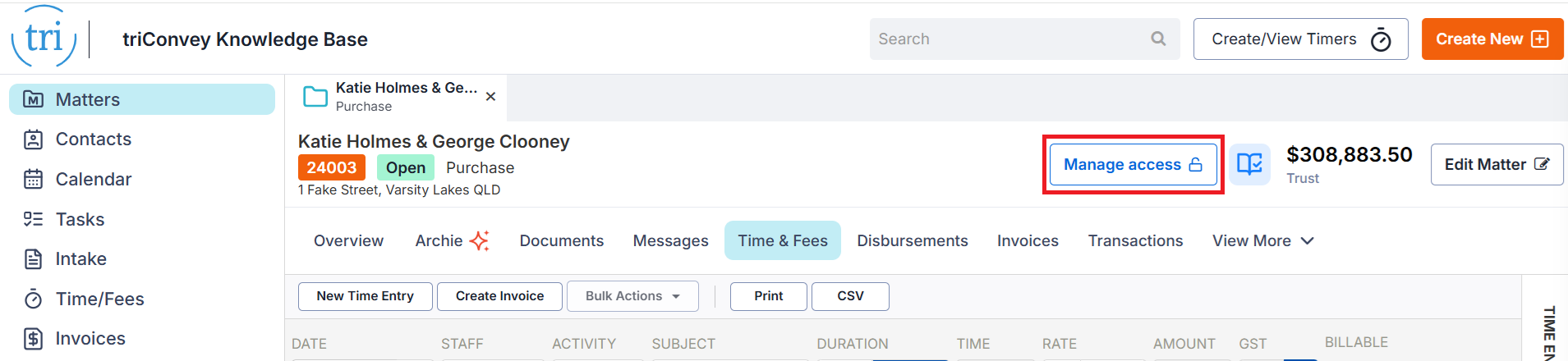
You can set up the permissions on this matter in one of two ways:
Refer to the expected behaviour of each configuration below:
In this example, only "Jeff Hayes", "Michael Meaney", "Teja Gowda" and "Toby Topsy" can access this matter today. If new staff members join after today, they can also access this matter.
In this example, only "Josh Testoe" can access this matter today and in the future.
Record AML Risk Assessments at matter-level
You can now keep a record of AML/KYC risk assessments on a matter, instead of solely in a contact card.
Under AML/CTF (Tranche 2) regulations, compliance and KYC obligations apply on a transaction-by-transaction basis for each designated service rather than to the client as a single entity.
Providing matter-level designations, audit trails, and reporting ensures your law firm can maintain statutory compliance and preserve accurate historical due diligence records for every matter.
To complete a Risk Assessment on a matter:
1. Open a matter in the triConvey Desktop App.
2. Double-click on the Info line under Matter Details.
3. Select the AML/CTF tab.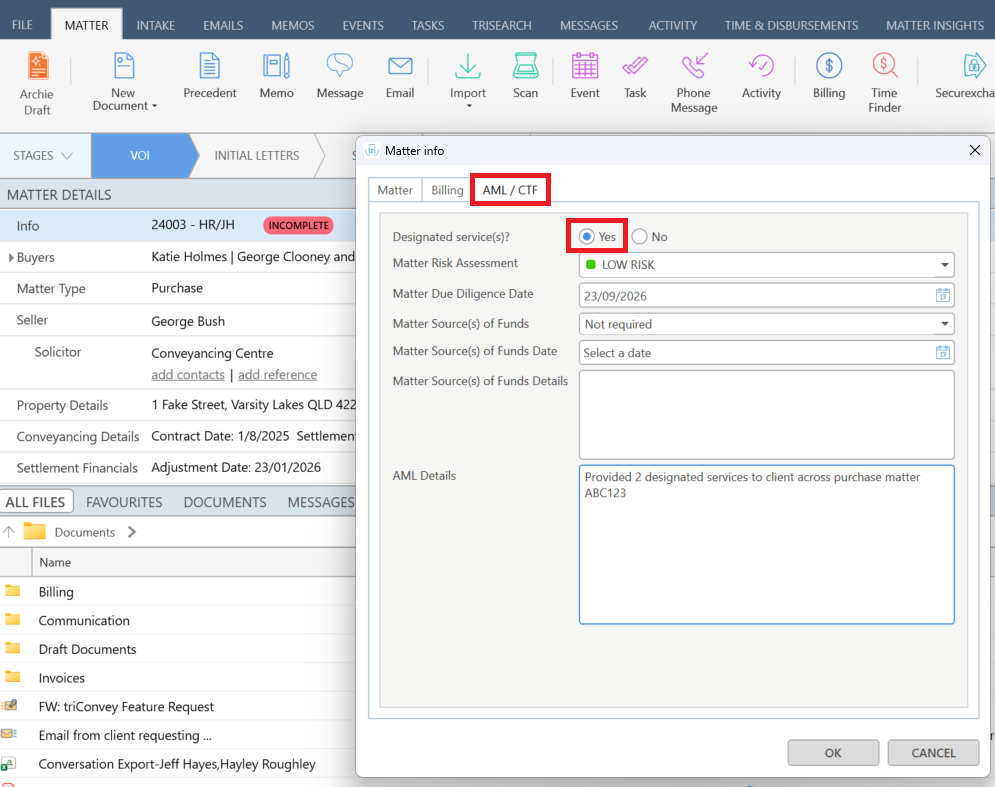
4. Next to Designated service(s)?, select Yes or No.
In addition, a new Risk Assessment column can now be selected from the Matter List when right-clicking the headings.
Refinements
Contact-level AML display changes
The Risk Assessment pill for the Client in a matter now lives in the Contact Details widget on the right-hand panel.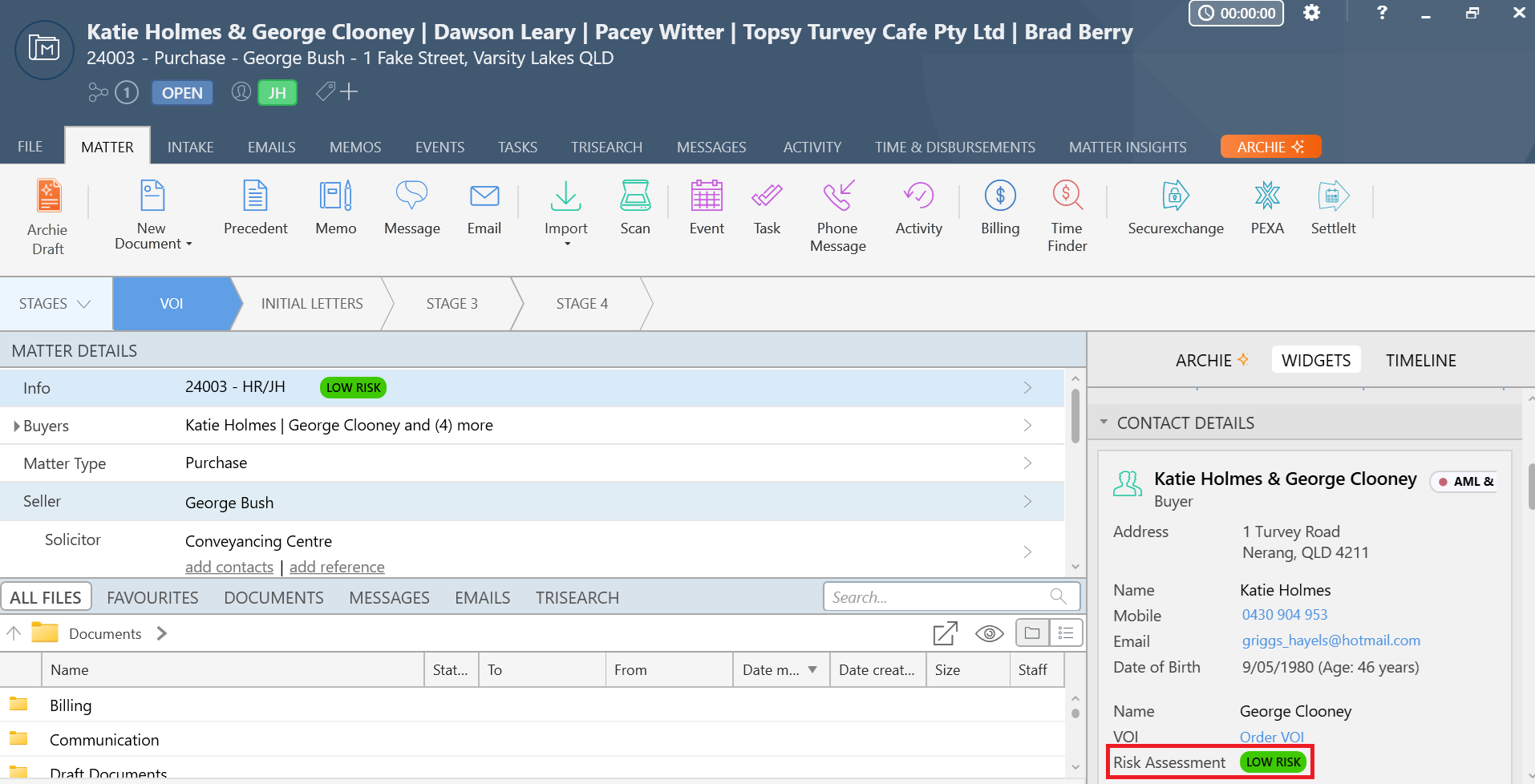
"Email as PDF" option for attachments when using New Outlook
If your firm is using New Outlook, right-clicking on one or more Word documents in the Documents List of a matter will now allow you to send these documents as PDF/s.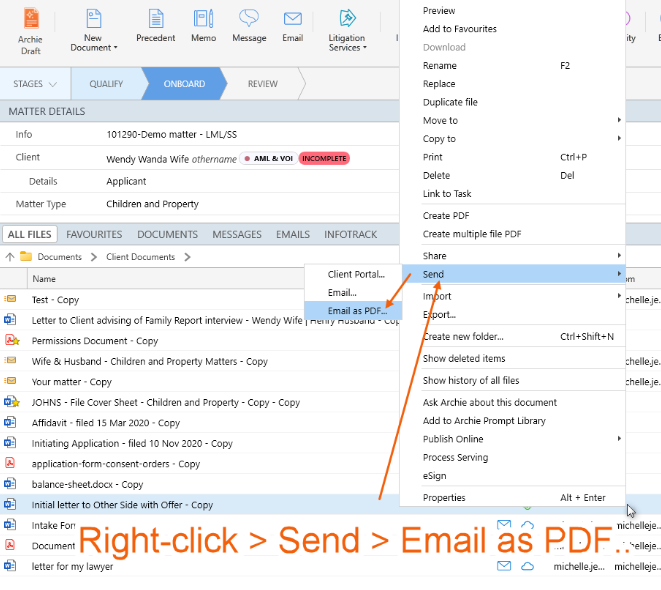
Note: The PDF is not saved back to the matter - it only exists as an attachment to the email.
0 Votes
0 Comments