Version 10.2 of the triConvey Desktop App contains the following new features and refinements. Version 10.2 is currently in beta testing.
New Features
Reset your matter number automatically in the new year
If your firm has automated matter numbering enabled, you can now turn on a setting that resets the numbering to 1 at the start of each calendar year. The first matter created in the new year will be numbered "1".
To access this setting, navigate to triConvey Settings > Matter Number and tick Reset Auto-counter at the beginning of the new calendar year.
Notes:
You must have Use auto-number enabled.
The matter number must contain a Date (YY) or Date (YYYY) component.
The Start from number is no longer relevant once Reset Auto-counter at the beginning of the new calendar year is enabled.
Read more about resetting your matter numbering at the beginning of a new calendar year.
Change the font and font size in PDF form text fields
When completing a PDF form in triConvey, you can now change the font as well as the font size of the form fields. Changes can be applied to a single field, to every field on the current page, or to every field in the whole document in one action.


Version 10.2 of the triConvey Desktop App contains the following new features and refinements. Version 10.2 is currently in beta testing.
New Features
Reset your matter number automatically in the new year
If your firm has automated matter numbering enabled, you can now turn on a setting that resets the numbering to 1 at the start of each calendar year. The first matter created in the new year will be numbered "1".
To access this setting, navigate to triConvey Settings > Matter Number and tick Reset Auto-counter at the beginning of the new calendar year.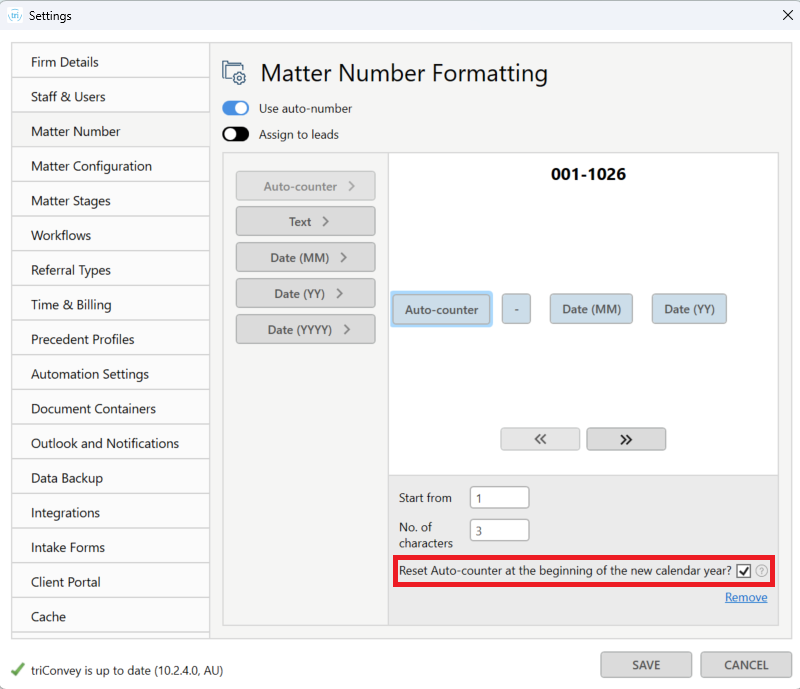
Notes:
Read more about resetting your matter numbering at the beginning of a new calendar year.
Change the font and font size in PDF form text fields
When completing a PDF form in triConvey, you can now change the font as well as the font size of the form fields. Changes can be applied to a single field, to every field on the current page, or to every field in the whole document in one action.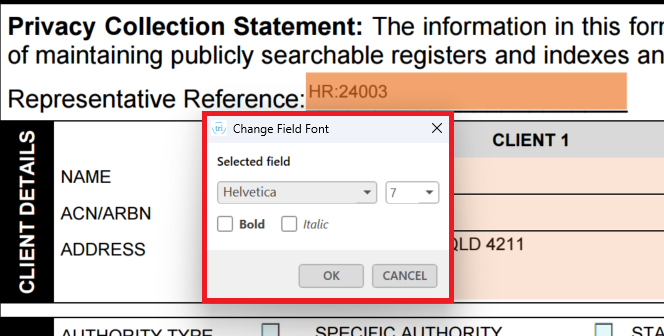
Learn more about changing the font and font size in PDF form fields.
0 Votes
0 Comments