Your 'New Search' and 'Fee Summary' buttons are changing
Posted
4 months ago
by Hayley Roughley
Topic is Locked
H
Hayley RoughleyAdmin
From mid-June, clicking either the 'New Search' or 'Fee Summary' button from the triSearch tab in your triConvey matter, will redirect you into One Flow in your web browser. The grey search bar in the triSearch tab of your triConvey matter will then be removed entirely from late July, making One Flow your single entry point for all triSearch services.
What to expect
Redirect: clicking either the 'New Search' or 'Fee Summary' button from the triSearch tab, opens One Flow in your web browser. This rolls out to NSW Sale, Proposed Sale and Purchase matters first (from approximately *15 June), with VIC Purchase and Sale matters and QLD Sale, Purchase, and Seller Disclosure matters following in early *August. *Dates are still to be confirmed.
Search bar removal (early August): the grey search bar will be removed from the triSearch tab in your triConvey matters entirely. One Flow becomes the single entry point for all triSearch services
Why this is necessary
triConvey has two ways to access triSearch, One Flow and the New Search button, and they don’t always show the same information. If one staff member places an order through the New Search button and another reviews it through One Flow, they may not be able to see each other’s work.
One access point fixes that. Everyone in your firm works from the same place, with full visibility across all orders on a matter, keeping your practice organised and prepared for upcoming compliance obligations.
How to access
No action is required ahead of the redirect. When the grey search bar is removed, One Flow in the triSearch tab of your matter becomes your starting point for all triSearch services.
For guidance, visit our One Flow support resources on The Campus, including FAQs and instructional videos, or reach out to your Account Manager.
Troubleshooting tips
In progress Contracts ordered from the New Search button
If you have ordered the Contract and certificates through the "New search" button, they will not be pulled through into One Flow. When entering One Flow from your matter you may be asked if you wish to purchase further documents, despite having completed them.
You can access these Contracts and certificates by:
1. Clicking on the triSearch tab in the matter.
2. Click on the Orders and documents milestone.
3. Click on the All Services folder and locate your Contract front pages (or equivalent).
4. Click on Open Order. This will open the older Contract workflow that was in progress so that you may complete the process.
0 Votes
0 Comments
People who like this
Delete Comment
This post will be deleted permanently. Are you sure?


From mid-June, clicking either the 'New Search' or 'Fee Summary' button from the triSearch tab in your triConvey matter, will redirect you into One Flow in your web browser. The grey search bar in the triSearch tab of your triConvey matter will then be removed entirely from late July, making One Flow your single entry point for all triSearch services.
What to expect
Why this is necessary
triConvey has two ways to access triSearch, One Flow and the New Search button, and they don’t always show the same information. If one staff member places an order through the New Search button and another reviews it through One Flow, they may not be able to see each other’s work.
One access point fixes that. Everyone in your firm works from the same place, with full visibility across all orders on a matter, keeping your practice organised and prepared for upcoming compliance obligations.
How to access
No action is required ahead of the redirect. When the grey search bar is removed, One Flow in the triSearch tab of your matter becomes your starting point for all triSearch services.
For guidance, visit our One Flow support resources on The Campus, including FAQs and instructional videos, or reach out to your Account Manager.
Troubleshooting tips
In progress Contracts ordered from the New Search button
If you have ordered the Contract and certificates through the "New search" button, they will not be pulled through into One Flow. When entering One Flow from your matter you may be asked if you wish to purchase further documents, despite having completed them.
You can access these Contracts and certificates by:
1. Clicking on the triSearch tab in the matter.
2. Click on the Orders and documents milestone.
3. Click on the All Services folder and locate your Contract front pages (or equivalent).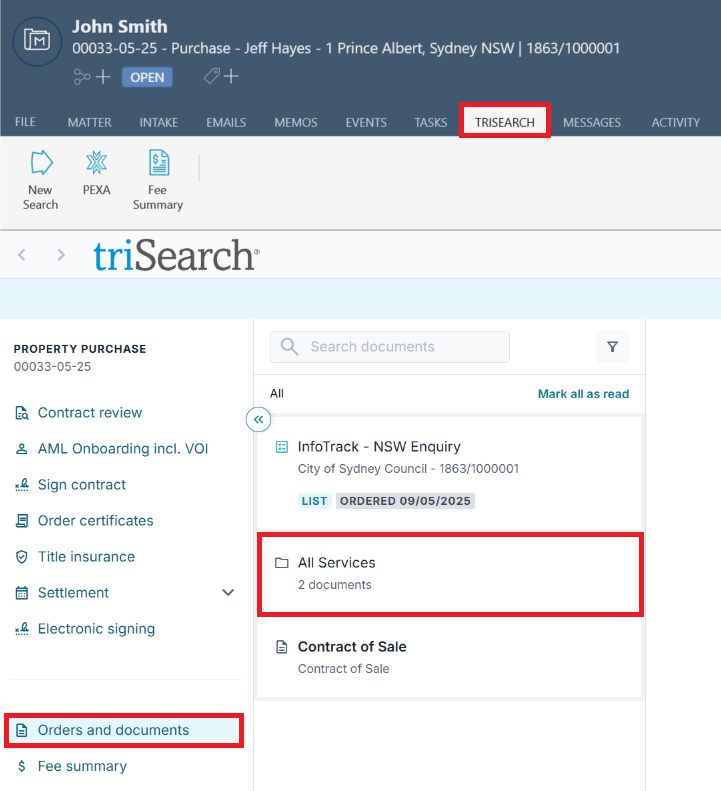
4. Click on Open Order. This will open the older Contract workflow that was in progress so that you may complete the process.
0 Votes
0 Comments