You can now create Field Sets, which are groups of contact fields that you can apply to future Intake Forms. This saves time with dragging and dropping each contact field into the form separately.
Select Add contact details on an empty section or drag the Contact details component in to access them.
We have created some preset contact field sets to get you started - select +Add to add them to the form.
Edit an existing Field Set by selecting the Ellipsis icon next to +Add. In the editor, you can add, reorder and delete fields from the Field Set.
If you wish to reuse this configuration in a future form, select Save for future use and give it a name.


2nd October 2026
triConvey Intake has been updated:
You can now create Field Sets, which are groups of contact fields that you can apply to future Intake Forms. This saves time with dragging and dropping each contact field into the form separately.
Select Add contact details on an empty section or drag the Contact details component in to access them.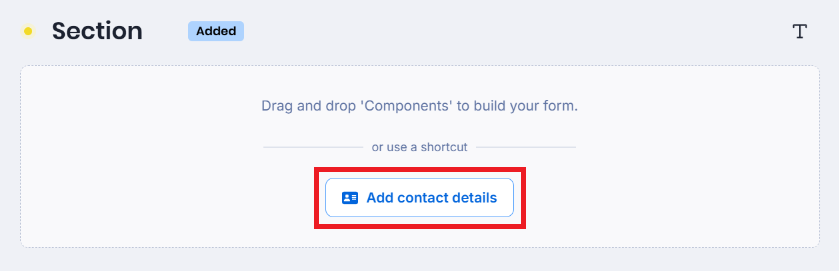
We have created some preset contact field sets to get you started - select +Add to add them to the form.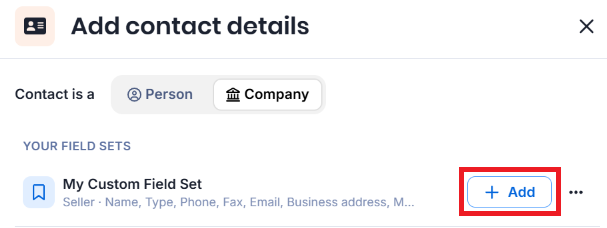
Edit an existing Field Set by selecting the Ellipsis icon next to +Add. In the editor, you can add, reorder and delete fields from the Field Set.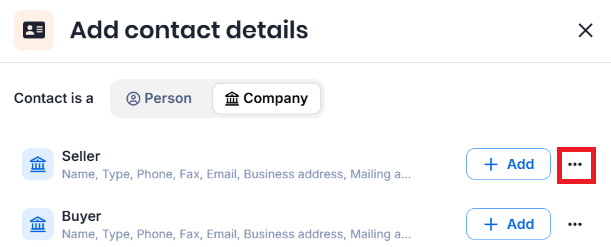
If you wish to reuse this configuration in a future form, select Save for future use and give it a name.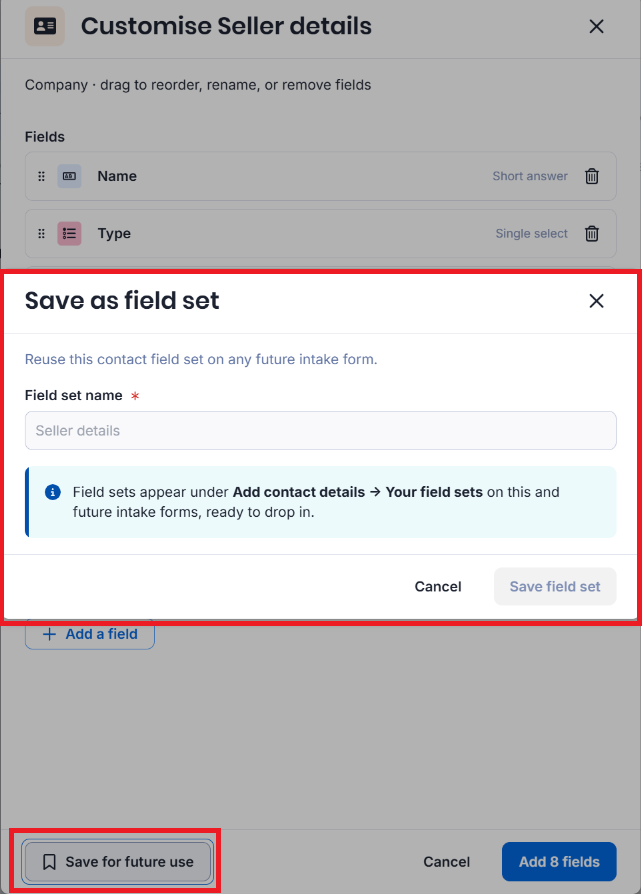
Learn more about Field Sets in our dedicated article.
The following refinements have also been released for triConvey Intake:
0 Votes
0 Comments