

Version 2607 of Microsoft Word has introduced a bug where paragraph numbering is not applied correctly.
As of 16 September 2026, it appears Microsoft has fixed the issue via a combination of version release and feature toggle. Ensure you have updated to the latest version of Word and restart your machine to apply the update.
Table of Contents
- How to determine if your version of Word is affected
- How to resolve the issue
- Interim workaround
- Frequently Asked Questions
How to determine if your version of Word is affected
To check if you are on Version 2607:
1. Open Microsoft Word.
2. Click File on the top-left corner.
3. Select Account (or Office Account) at the bottom of the left panel.
4. Under Product Information, look for:
- Version (for example, “Version 2607”)
- Update Channel (for example, “Current Channel” or “Monthly Enterprise Channel”)
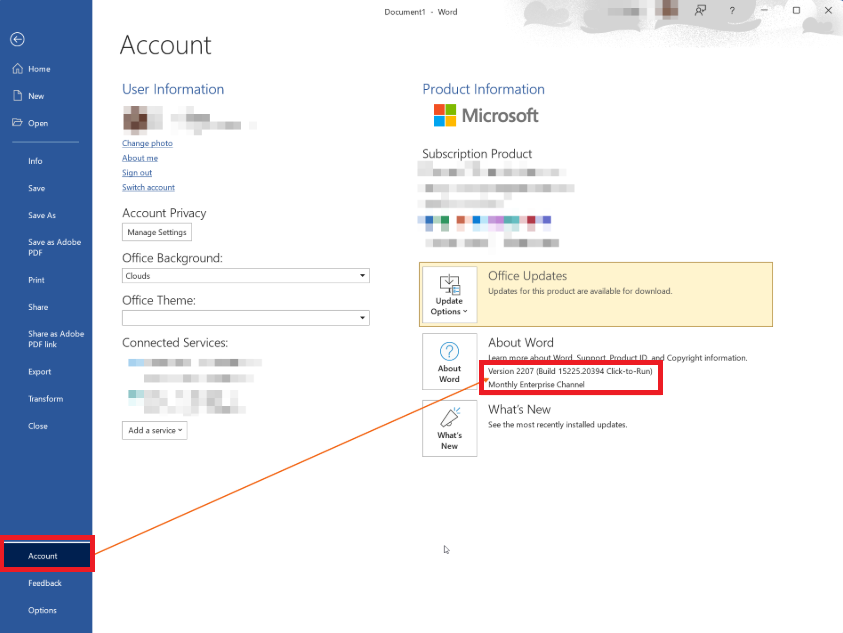
If you are on the Current Channel, it means you get new features and fixes as soon as Microsoft releases them. Unfortunately this also means that you may get new bugs earlier, which is what has happened this time with Version 2607.
How to resolve the issue
This issue is dependent on Microsoft releasing a fix to the bug introduced in Version 2607. This would mean waiting for the next version to be released on the Current Channel.
However, we recommend switching to the Monthly Enterprise Channel which does not have Version 2607 yet as it only releases updates once a month. Staying on the Current Channel has caused issues recently (such as the 2601 bug).
Therefore we recommend moving from the Current Channel to the Monthly Enterprise Channel, and remaining on it until Microsoft has fully resolved the issue.
Important Note: Moving Channels should only be done by your IT provider or System Administrator. Do not attempt to change the Channel yourself if your firm has managed IT.Follow the Microsoft article for steps on moving Channels: Change the Microsoft 365 Apps update channel for devices in your organisation.
Interim workaround
While arranging to change to the Monthly Enterprise Channel, you can contact us to set affected documents to use Compatibility Mode so Word uses a different rendering engine. The bug sits in Word's standard rendering engine, so compatibility mode bypasses it.
Important limitations
- This option is not available in the Word user interface. It must be applied manually by a developer, per document, so it does not scale.
- Compatibility mode uses Word's older rendering format. It may affect more modern functionality in a document. Nothing has surfaced so far, but we cannot rule it out.
- Documents already set to compatibility mode will behave the same in all Word versions. They do not need to be reset when a new Word release comes out.
For these reasons, compatibility mode is a safe stopgap but not our preferred fix.
Frequently Asked Questions
Was this article helpful?
That’s Great!
Thank you for your feedback
Sorry! We couldn't be helpful
Thank you for your feedback
Feedback sent
We appreciate your effort and will try to fix the article