Temporary triConvey disruption update - 26 March 2026
Posted
7 months ago
by Hayley Roughley
Topic is Locked
H
Hayley RoughleyAdmin
If you’re seeing an error that your triConvey credentials have expired, the Firm Owner will just need to reconnect triConvey using their website credentials (steps below). If you do not know these, please go to trisearch.com.au and have the Firm Admin reset them.
Once you have the credentials, please head to triConvey and click on 'File' in the top left hand corner and then 'triConvey settings'.
Find the integrations tab and select triSearch > First click on the 'Deauthorise' button and then click the 'Authorise' button and enter credentials. We are working to find a solution and will send an update shortly. We apologise for the inconvenience this may have caused.
0 Votes
0 Comments
People who like this
Delete Comment
This post will be deleted permanently. Are you sure?


If you’re seeing an error that your triConvey credentials have expired, the Firm Owner will just need to reconnect triConvey using their website credentials (steps below). If you do not know these, please go to trisearch.com.au and have the Firm Admin reset them.
Once you have the credentials, please head to triConvey and click on 'File' in the top left hand corner and then 'triConvey settings'.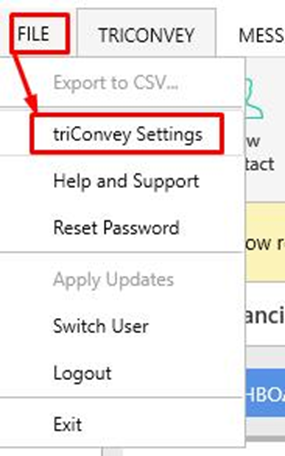
Find the integrations tab and select triSearch > First click on the 'Deauthorise' button and then click the 'Authorise' button and enter credentials.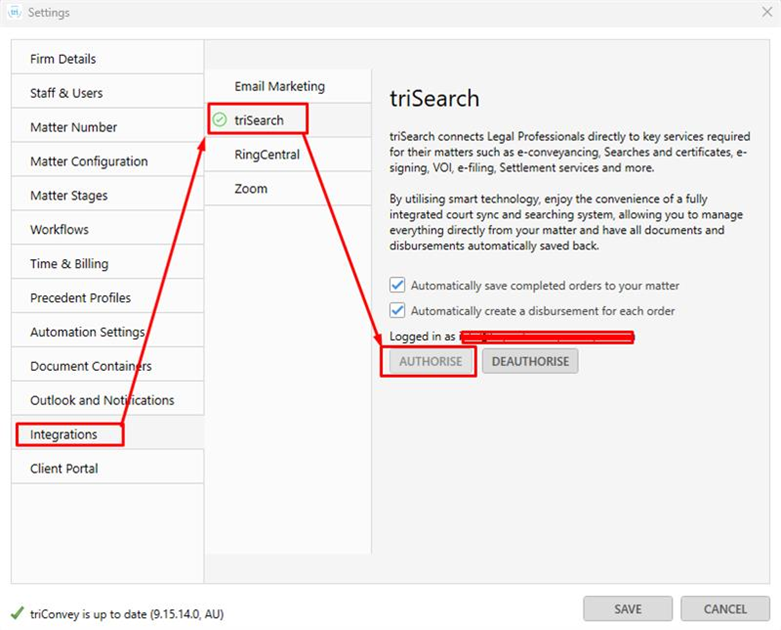
We are working to find a solution and will send an update shortly. We apologise for the inconvenience this may have caused.
0 Votes
0 Comments