Before sharing an Intake Form to a client, there is now a warning if there's a newer unpublished version of the form. From here, you can select Review Changes to open the Form Builder and see the unpublished edits, or Publish Now to publish the edits.
The prompt to Publish a form also now appears if you do the following actions:
Toggle the autofill setting on or off in the Form Builder.
Change the translation languages on an existing form.
Create a form using AI - the prompt to publish now appears the first time the form is generated.
4th June 2026
triConveyIntake has been updated with the following new features:
Whenever you make changes on an Intake Form, these changes won't be published live to form respondents until you select Publish. Publishing a form also creates a new version of the form in Version History, which you can revert to if needed. Learn more about how Version History and Publishing works for Intake Forms.
You can now enable Voice Guide, an option for your form respondents to fill in the form using voice. When activated, a voice assistant will dictate questions to the respondent and record answers via speech-to-text. Learn more about turning on Voice Guide for your firm's Intake Forms.
0 Votes
0 Comments
People who like this
Delete Comment
This post will be deleted permanently. Are you sure?


17 June 2026
Before sharing an Intake Form to a client, there is now a warning if there's a newer unpublished version of the form. From here, you can select Review Changes to open the Form Builder and see the unpublished edits, or Publish Now to publish the edits.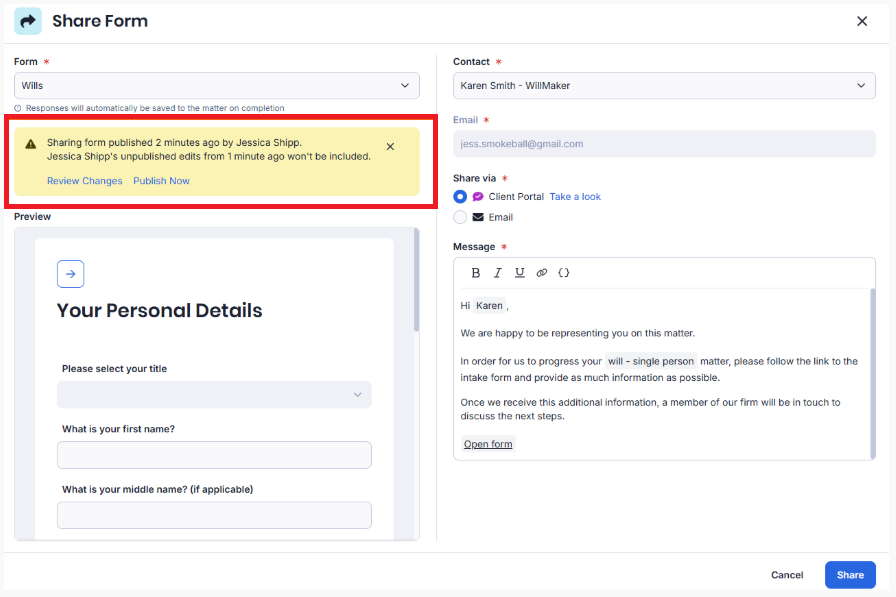
The prompt to Publish a form also now appears if you do the following actions:
4th June 2026
triConvey Intake has been updated with the following new features:
0 Votes
0 Comments