

Learn how to connect File Republic Storage (formerly known as FileMan) to triConvey, allowing you to access triConvey matters in File Republic Storage.
Table of Contents
- Getting Started
- Before you enable the integration
- What is the File Republic Storage Integration
- Enable the File Republic Storage Integration
- How the File Republic Storage Integration works
This article relates to the File Republic Storage App and its integration with triConvey. Refer to the File Republic Productivity Integration article if you're looking for an integration with the File Republic Productivity App (formerly known as BundlePro).Getting Started
triConvey is built on Smokeball, so when you connect a third-party app you'll be asked to authorise Smokeball, even though you're setting it up from triConvey.
Before you enable the integration
Please reach out to our Support team to request integration access. Once integration has been granted, proceed with the instructions below to complete the integration steps.
What is the File Republic Storage Integration
File Republic is a cloud-based information management platform that allows your firm to manage the storage or destruction of closed files as a one-off disbursement. Learn more about File Republic on their website.
Already using File Republic Storage?

Before you enable the integration in triConvey, call File Republic on 1800 820 061. File Republic will configure your account to ensure your files sync across to triConvey properly.
By integrating with triConvey, you can gain access to the File Republic portal directly from a matter, where you can access archived files or request retrieval.
Enable the File Republic Storage Integration
1. Select the gear icon from the top-right corner of triConvey.
2. Select the Integrations tab and then select FileMan.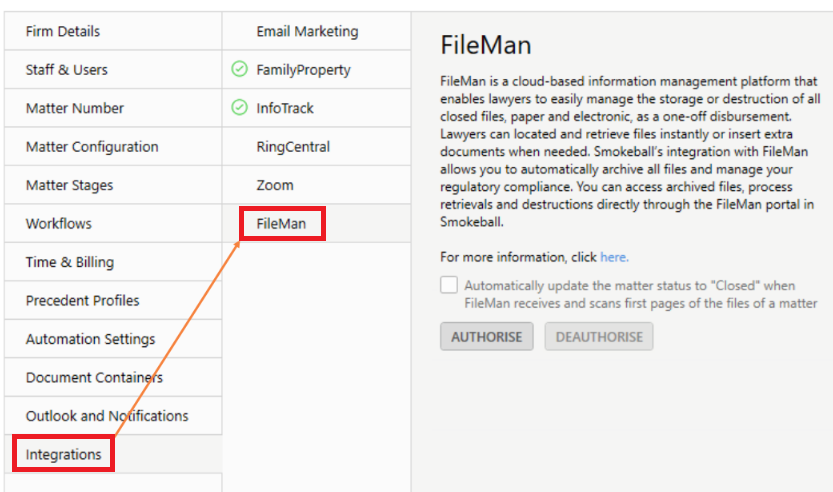
3. Click Authorise to get started.
4. Enter your File Republic username and password to connect the integration. You will be presented with a confirmation message once this is completed.
5. The integration can mark a matter as Closed when File Republic receives and scans the first physical pages of the files in a matter. If you would like to enable this, tick the box.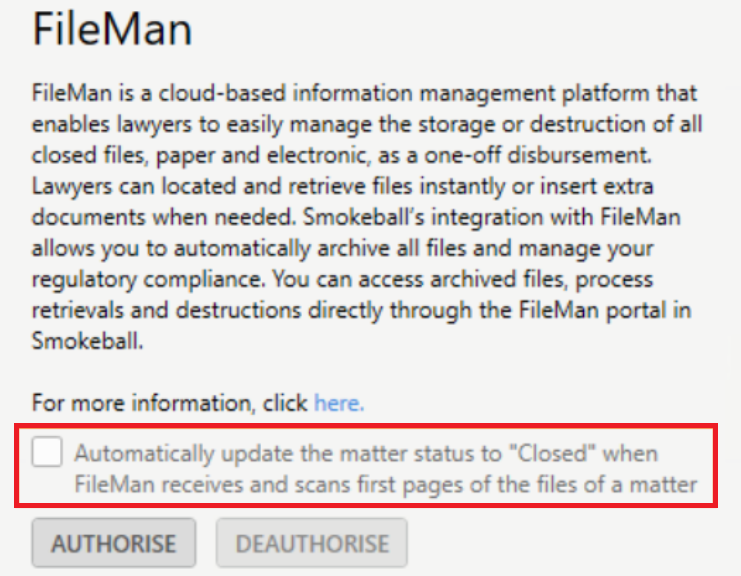
How the File Republic Storage Integration works
When you open a new matter in triConvey, its data is sent to File Republic. File Republic creates a record and a one-off disbursement on the Smokeball matter. Note that this disbursement is only recorded when a Person Responsible is assigned to the matter.
Disbursements are created for every triConvey matter. Contact File Republic directly if you wish to reverse a disbursement for a specific matter.
When a matter is ready to be archived, File Republic will come to your office and collect the physical files related to the matter. These are then scanned and uploaded to the File Republic portal, where you can access the files, request retrieval and more.
To access the File Republic portal:
1. Open the matter, then double-click on the Info field to access Matter Info.
2. Select Go to FileMan in the bottom-left corner.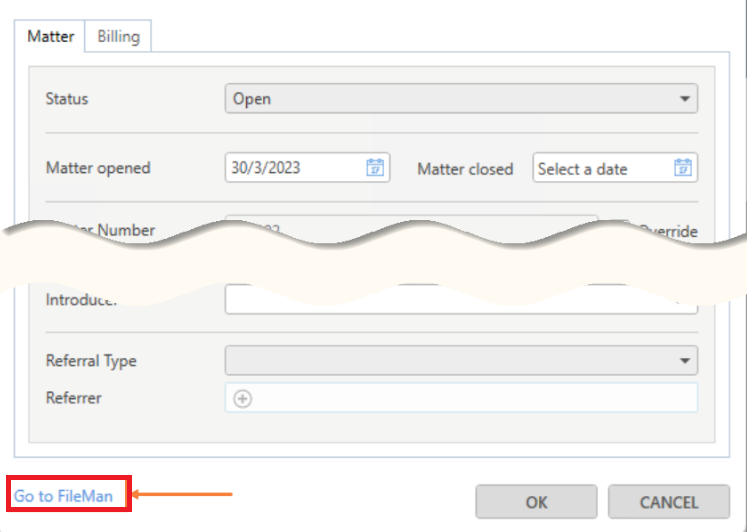
Note: This link will only work after matters are synced to File Republic, which currently happens overnight.
A note on support scope
triConvey integrates with this third-party solution but does not develop or manage it. Our support team can assist with issues related to the integration not functioning correctly within triConvey (e.g., it's not appearing or working as expected). Questions about the tool's functionality, features, or capabilities should be directed to File Republic (https://www.filerepublic.com.au/).
Was this article helpful?
That’s Great!
Thank you for your feedback
Sorry! We couldn't be helpful
Thank you for your feedback
Feedback sent
We appreciate your effort and will try to fix the article