

The Compliance Centre has been designed to support your Firm in meeting your AML/CTF Tranche 2 obligations. Use it to complete your firm risk assessment, develop your policies, onboard and train your staff and more.
Table of Contents
- Getting Started
- Determine who the Admin user is of the firm
- Accessing the Compliance Centre for the first time as Admin
- Navigating the Compliance Centre
Getting Started
The Compliance Centre is only accessible at first by the Admin user of triSearch. Before any other user can access the Compliance Centre, the Admin user is required to select the sector of the Firm and Assign roles. The Admin user is usually the Firm Owner.
Determine who the Admin user is of the firm
Only the Admin User will be able to view Users.
From a Matter in triConvey
1. Click the triSearch tab.
Tip: If the Compliance Centre is not displayed in the matter, click New Search and then follow the instructions below "From the Web".
2. Select the person icon from the top right corner and then select Settings.
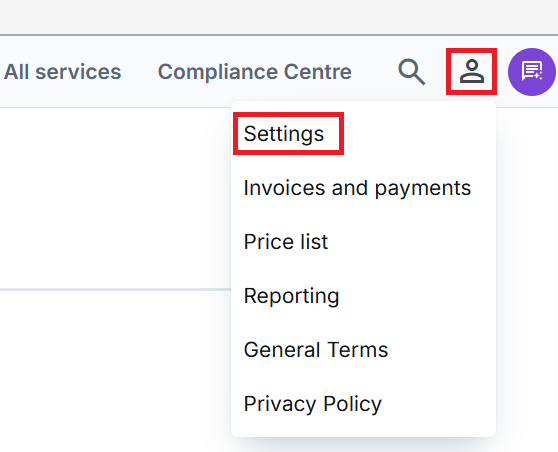
3. Select Users from the left menu.
4. Review the role Type column for the Admin user's name.
From the Web
1. Select the settings icon from the top right corner.
2. Select the Users tab from the left menu.
3. Review the role Type column for the Admin user's name.
Accessing the Compliance Centre for the first time as Admin
When accessing the Compliance Centre for the first time as the Admin, you will need to complete the following details so that the remaining users of the firm can access the Compliance Centre:
1. Select your sector; and
2. Assign roles.
Navigating the Compliance Centre

Transactions
The Transactions tab provides a centralised, firm-wide view of all AML-related matters and client transactions. Compliance Officers can monitor activity in real time, identify high-risk clients, review escalated matters, and finalise decisions directly within the platform. This ensures clear oversight, proper documentation of decisions, and a structured audit trail for regulatory purposes.
Firm Risk Assessment
The Risk Assessment tool enables firms to conduct a structured, firm-wide AML/CTF risk assessment. Through a guided questionnaire, the system assesses factors such as services offered, client types, geographic exposure, and delivery channels. The platform then generates a detailed risk summary outlining key risk areas and suggested mitigation strategies, helping firms meet their regulatory obligations with confidence.
Policy and process
The Policy and process tab allows firms to either upload their existing AML/CTF policy or generate a tailored program within the platform. The generated program aligns closely with the AUSTRAC AML/CTF starter program template while allowing full customisation to reflect the firm’s specific operations, risk profile, and internal controls. This ensures both regulatory alignment and practical applicability.
Staff onboarding
The Staff onboarding tab gives Compliance Officers full visibility over all staff members and their AML compliance status. It tracks onboarding progress, training completion, and certification status for each individual. This ensures the firm can demonstrate that all relevant personnel have completed mandatory AML obligations and remain up to date with compliance requirements.
Tip: This tab will only be visible to the role types of Governing Body, Senior Manager and Compliance Officer.
Training
The Training tab provides access to a structured AML learning program developed by Grant Thornton. It includes 10 comprehensive modules covering core AML/CTF topics, regulatory obligations, and practical risk scenarios. Staff can complete the training online at their convenience, and upon successful completion, download a certificate for record-keeping and audit purposes.
AUSTRAC reports
We are currently working with AUSTRAC to gain access to their APIs. Once integrated, this tab will enable firms to prepare and submit required AML/CTF reports directly from within the Compliance Centre. This will streamline reporting workflows and eliminate the need to log into external portals, creating a more seamless compliance experience.
Add AUSTRAC No.
Once you have registered with AUSTRAC, record and store your AUSTRAC enrolment number here.
AUSTRAC links
Access AUSTRAC legislation, Starter Kits and the Enrolment website directly from the Compliance Centre.
Was this article helpful?
That’s Great!
Thank you for your feedback
Sorry! We couldn't be helpful
Thank you for your feedback
Feedback sent
We appreciate your effort and will try to fix the article