

This guide covers the purpose and functionality of Archie Playbooks, including what they can and cannot do, and best practices for writing rules that deliver reliable, consistent results.
Table of Contents
- Getting Started
- What are Playbooks?
- What Playbooks are useful for
- Understanding your review results
- What can you do with a finding
- What Archie Playbooks can and cannot check
- Writing effective playbooks
- Before you publish a Playbook
Getting Started
New to Archie? Learn more about Archie AI. Please note, you will need to install the Archie Word Add-In to use Playbooks.
What are Playbooks?
A Playbook is a collection of rules that tells Archie what to look for when reviewing a document. As a user, you can define the requirements for a playbook (the clauses that must be present, the language that must be used, the sections that must appear) and Archie will apply these requirements against a document you're reviewing in Microsoft Word.
This means your whole team is able to review documents to the same standard, every time. Nothing gets missed because someone was in a hurry, and junior staff get the same guidance as someone with years of experience reviewing that document type.
What Playbooks are useful for
- Checking required clauses and sections are present.
- Applying a standard across the whole document — every clause that falls short is returned, including ones in schedules and annexures.
- Checking the document against itself — whether a term or amount stated in one part matches what's stated elsewhere.
- Flagging triConvey Automation merge fields that came through unfilled, and naming the matter field to correct.
- Verifying structural requirements (headings, labelling as text).
- Catching common drafting errors before a document gets sent to an external party.
Example document types
Below are some examples of where Archie playbooks can help. Start with a pre-built playbook from our legal content team where available (marked below).
- General: Costs Disclosure
- Conveyancing: Contract for Sale
Understanding your review results
When you run a Playbook, Archie evaluates every rule included in the playbook and returns one of three outcomes for each rule:
Result | Definition and suggested action |
Passed | The rule's requirement was found clearly in the document text. No action needed. |
Warning | Something was found but may need attention. Archie won't change it for you; you can jump to it in the document or add a comment for team review. |
Issue | A required element is missing or incorrect. Where Archie has enough information, it suggests a change you can apply to the document. Where it doesn't, it explains what's wrong without a suggestion. |
- Each rule is made up of one or more conditions — one for each distinct thing the rule checks. A "Payment terms" rule might check that an amount is stated, that a due date is given, and that interest is mentioned: three conditions in one rule.
- Every condition gets its own outcome, and the rule shows the worst outcome of its conditions — an Issue if any condition is an Issue, otherwise a Warning if any condition warns, otherwise Passed. That's why a rule can show as an Issue when most of what it checks is fine. Open the rule to see which condition caused it.
- Each condition also lists every place in the document it applies — one entry per location, each with its own explanation and its own action. A standard breached in six clauses gives you six entries, not one standing in for all of them.
This is what it will look like when running a Playbook: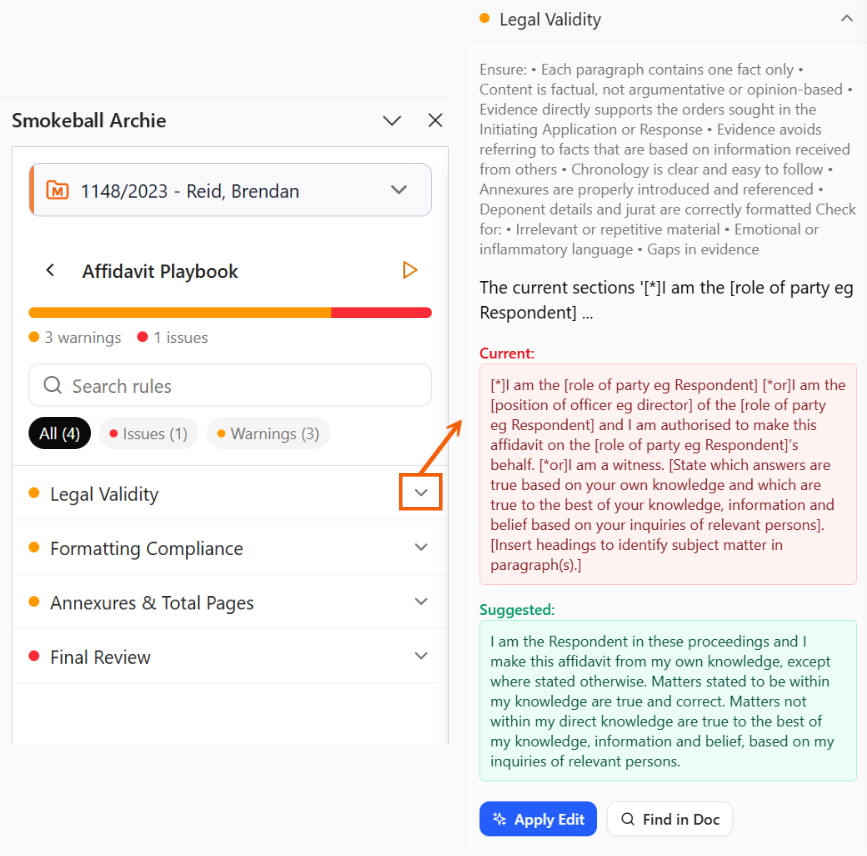
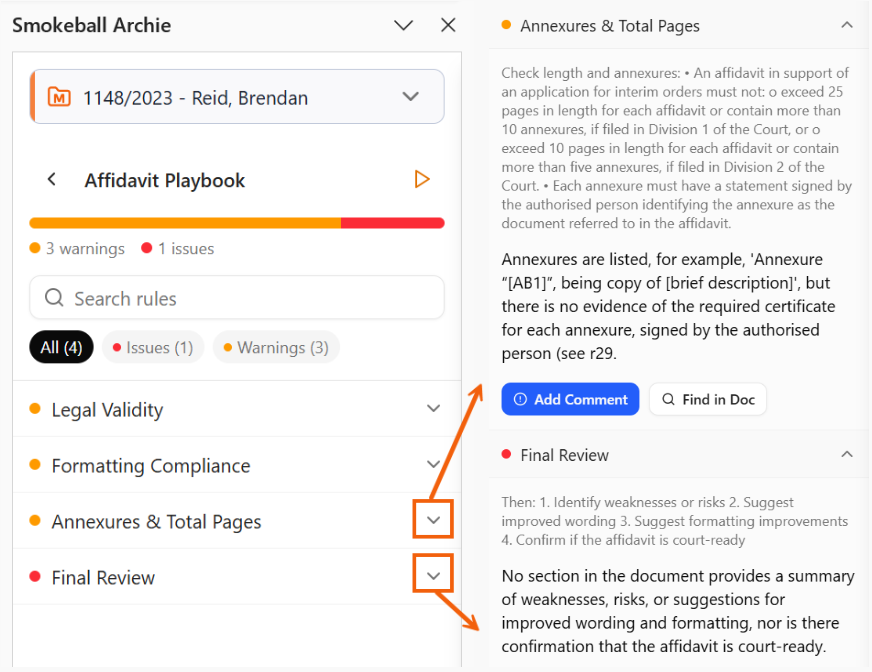
Applying a fix doesn't re-check the document. The finding is marked Applied and the panel shows 'All suggested edits applied — re-run to re-verify'. Re-run playbook is what updates the statuses.
What can you do with a finding
The following actions can be taken depending on the nature of the finding. Not every action below is available for each finding:
- Find in doc — jumps the document to the finding and highlights the exact words Archie quoted. Nothing is changed. It appears whenever Archie knows where the finding is. It won't appear on findings about the document as a whole, because there's no single place to send you. If the text has been edited since the review ran, you'll see "Couldn't locate this text in the document" rather than nothing happening.
- Apply edit — replaces the quoted text with Archie's suggested wording as a tracked change, to accept or reject like any other Word revision. It appears only where Archie has replacement wording ready and knows exactly which occurrence to put it on. It won't appear where the content is missing entirely, where the call needs legal judgement, or where two findings name the same sentence and Archie can't be sure which one is meant.
- Add comment — inserts a Word comment anchored to the quoted text, recording the rule and Archie's explanation. The document text is untouched. It appears where Archie has quoted specific text but has no fix to offer — the cases where the decision is yours.
- Some findings have no buttons at all. That's deliberate: the finding is about the document as a whole — its overall tone or structure, or whether a clause exists — so there's no specific place to point to and nothing to insert. You get the explanation on its own.
Fixes can be applied one finding at a time, or in bulk: Apply all (N) on a condition applies every fixable finding inside that check, and Apply all edits (N) at the bottom of the panel applies every fixable finding in the playbook. The N counts only findings that have a suggested fix, so it's usually lower than the total number of results.
Re-running the Playbook recomputes everything from scratch: resolved findings drop out and nothing carries over from the previous run. If the playbook is edited elsewhere while a review is open, an amber notice appears — "This playbook changed. Re-run to analyze the latest version" — and your results are kept until you choose to re-run.
What Archie Playbooks can and cannot check
Archie can only read the text of the open Word document you are viewing at the time.
It has no access to the triConvey matter (e.g. client records, filed documents, or any other information outside the document). If something is not written in the document, Archie cannot check it.
- Archie can verify structure and language - whether the right clauses are present, the wording meets the standard, the correct statutory references and party labels are used.
- Archie can see each paragraph's Word style (Heading 1, Heading 2) and its list numbering and level, so numbering and heading-style checks are reliable.
- Archie cannot verify whether the content is correct - it can see that a purchase price, party name, or governing law is stated, but not whether any of it is right. That remains a matter for the law professional to work through.
In summary, Playbooks can check that a document is structured correctly and contains the right content. However, they cannot tell you whether the information inside that content is accurate.
Writing effective playbooks
Follow the steps to create a playbook and apply the following structure and writing recommendations to build the most effective playbooks for your firm.
General Playbook Structure Tips
- A Rule Name and Instructions are both required.
- States and Matter Types are optional, but they're what gets a playbook promoted under Suggested for this document with a % match score when a lawyer opens a matching document — leave them empty and the playbook is available everywhere but never suggested.
- A playbook holds up to 50 rules; a large playbook against a long document takes noticeably longer to run, so keep each one to a single document type.
Rule Structure and Writing Tips
We recommend using this structure as a starting point:
The document must [contain / include / state] [specific element] [in / within the X section / clause / paragraph].
Matter specific example
Conveyancing Law matter - Residential Purchase Agreement
- The agreement must state the total purchase price as a specific dollar amount and identify the amount of the earnest money deposit and who will hold it.
- The agreement must include a property description that states the full legal address, the lot or parcel number or legal description, and either specifies any inclusions or exclusions such as fixtures or appliances, or explicitly states that no inclusions or exclusions apply.
General Guidelines
- Write rules in plain language. Name the elements you want checked explicitly.
- Phrase whole-document standards so every breaching clause is a hit ("every notice provision must allow at least 60 days"), not as a question about whether a provision exists.
- Reference the exact section or clause where the element should appear — this helps Archie find it.
- The more precise the language — a full citation, a defined term, a specific phrase — the more reliable the check.
- Write separate rules for separate requirements and do not combine multiple unrelated checks into one rule.
- Make both the rule name and description clear — the rule name heads the finding, and the Instructions appear directly beneath it in the results. Instructions are also what Archie evaluates against, so write them to work for both.
- Test every rule on a real, fully-drafted document before publishing it.
- Do not write rules that depend on information not present in the document.
- Rules that compare two parts of the document work well, but read those suggested edits individually — Archie can see the two disagree, not which one is right.
- Do not use vague language like 'solid legal argument', 'complete and accurate', or 'appropriate tone'.
- Do not build rules intended to replace a lawyer's substantive judgment.
- Do not write rules for images, charts, or any content that isn't typed document text — Archie cannot see these elements of a document.
- Do not write rules that check or depend on character formatting — bold, italic, font size, or colour text formatting in a document is not visible to Archie so cannot be checked.
Before you publish a Playbook
We recommend going through these questions before creating a new Playbook or adding a new rule to a Playbook:
1. Is every rule answerable solely from the document text?
2. Have I avoided rules that require access to triConvey matter data to evaluate?
3. Is my pass/fail condition clear enough that two lawyers would agree on the result?
4. Have I written clear Instructions for each rule? They are what Archie evaluates, and what users read under the rule name in the results.
5. Have I tested the Playbook on a real, fully-drafted document before publishing?
6. Have I avoided rules that ask Archie to assess legal quality rather than document content?
7. Have I set the States and Matter Types so the playbook is suggested on the documents it's meant for?
8. If a rule states a standard the whole document must meet, have I phrased it so every breaching clause is a hit?
triConvey AI disclaimer
Like all AI tools, Archie is powerful but not infallible. Always review Archie's findings carefully before acting on them. Archie is a document review assistant, not a substitute for legal judgment.
Was this article helpful?
That’s Great!
Thank you for your feedback
Sorry! We couldn't be helpful
Thank you for your feedback
Feedback sent
We appreciate your effort and will try to fix the article