

Learn how to configure triConvey to apply partial payments on disbursements in full, before they are applied to time and fees.
Table of Contents
- Getting Started
- Setting your firm's Partial Payment Allocation option
- Where to view Partial Payment Allocations
- Frequently Asked Questions
Getting Started
By default, triConvey applies partial payments evenly across time, fees and disbursements. You may wish to change this to apply to disbursements first, for the following reasons:
- To prioritise expense reimbursement, so your firm is not paying out-of-pocket for an expense incurred on behalf of the client.
- To avoid misrepresenting income by preventing payments from being applied to billable hours prematurely.
- To prevent overcompensation and inflated bonus calculations that can occur when payments are applied to fees instead of disbursements.
Important Note for Xero/MYOB users

Due to the way the triConvey integration works with Xero and MYOB, payments against invoices must stay proportional. Xero and MYOB's API does not allow payments against invoices to target specific parts of the invoice.

Therefore if you have connected Xero or MYOB to triConvey, we recommend you stick to the Pay all line items proportionally setting (i.e. the default setting) so that allocation figures in the Income Allocation Reports remain consistent.
Setting your firm's Partial Payment Allocation option
1. From the triConvey Companion Site Web App, select the gear icon from the bottom-left corner.
2. Select Firm Settings.
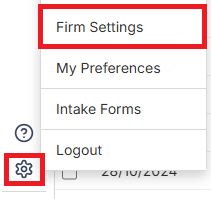
3. Select Accounts from the left menu and then select the Payment Allocations tab.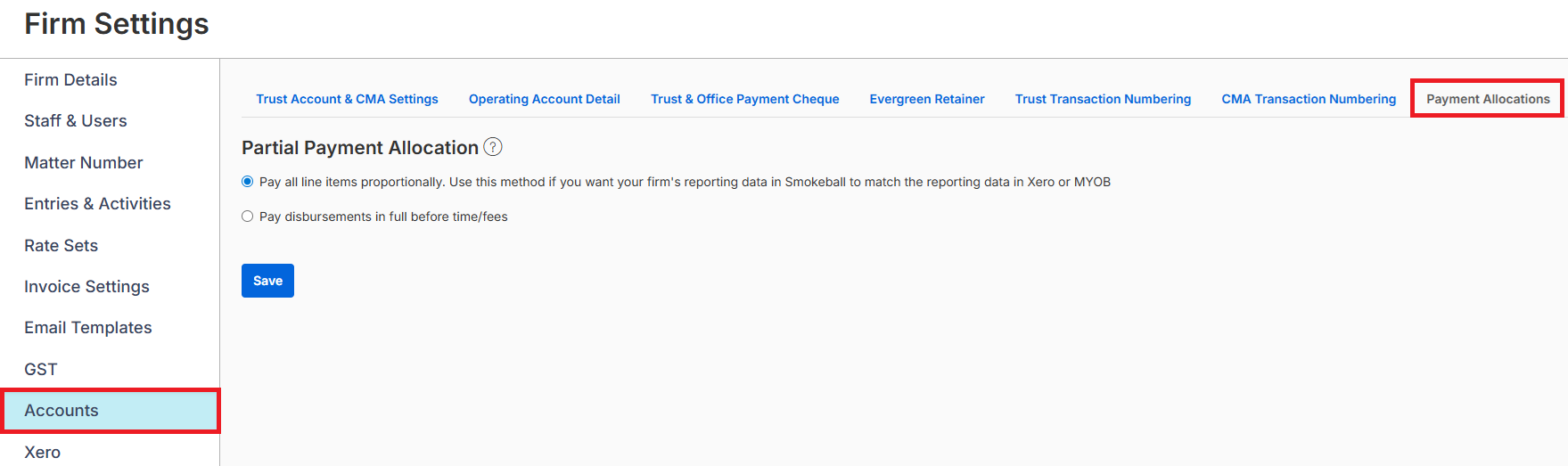
4. Choose the Partial Payment Allocation relevant to your firm:
- Pay all line items proportionally - partial payments are applied evenly across time, fees and disbursements. For example, an invoice with $100 fees and $100 disbursements has a $100 payment applied to it. This will apply $50 to fees and $50 to disbursements.
- Pay disbursements in full before time/fees - For example, an invoice with $100 fees and $100 disbursements has a $100 payment applied to it. This will apply $0 to fees and $100 to disbursements.
- The order in which partial payments are allocated under this option are as follows:
- Disbursement - Hard Cost with GST
- Disbursement - Hard Cost without GST
- Disbursement - Soft Cost with GST
- Disbursement - Soft Cost without GST
- Proportional timekeepers with proportional GST
- Surcharge with GST
- Interest
- The order in which partial payments are allocated under this option are as follows:
5. Select Save.
Where to view Partial Payment Allocations
Partial Payment Allocations are currently only reflected in the Income Allocation - Summary and Income Allocation - Details Reports.
Frequently Asked Questions
Was this article helpful?
That’s Great!
Thank you for your feedback
Sorry! We couldn't be helpful
Thank you for your feedback
Feedback sent
We appreciate your effort and will try to fix the article